- List
- accept_action · append · browser · count · index · insrt · o · object · prepend · remove · remove_all · scroll_pos · select · select_action · selected
List¶ ↑
- class List¶ ↑
List of objects
- Syntax:
h.List()
h.List("templatename")
- Description:
The List class provides useful tools for creating and manipulating lists of objects. For example, if you have a network of cells connected at synapses and each synapse is a separate object, you may want to use lists to help organize the network. You could create one list of all pre-synaptic connections and another of post-synaptic connections, as well as a list of all the connecting cells.
- List()
- Create an empty list. Objects added to the list are referenced. Objects removed from the list are unreferenced.
- List("templatename")
- Create a list of all the object instances of the template. These object instances are NOT referenced and therefore the list dynamically changes as objects of template instances are created and destroyed. Adding and removing objects from this kind of list is not allowed.
- List.append()¶ ↑
- Syntax:
- .append(object)
- Description:
- Append an object to a list, and return the number of items in list.
- List.prepend()¶ ↑
- Syntax:
- .prepend(object)
- Description:
- Add an object to the beginning of a list, and return the number of objects in the list. The inserted object has index=0. Following objects have an incremented index.
- List.insrt()¶ ↑
- Syntax:
- .insrt(i, object)
- Description:
Insert an object before item i, and return the number of items in the list. The inserted object has index i, following items have an incremented index.
Not called insert because that name is a HOC keyword.
- List.remove()¶ ↑
- Syntax:
- .remove(i)
- Description:
- Remove the object at index i. Following items have a decremented index. ie it's often most convenient to remove items from back to front. Return the number of objects remaining in the list.
- List.remove_all()¶ ↑
- Syntax:
- .remove_all()
- Description:
- Remove all the objects from the list. Return 0.
- List.index()¶ ↑
- Syntax:
- .index(object)
- Description:
- Return the index of the object in the list. Return a -1 if the object is not in the list.
- List.browser()¶ ↑
- Syntax:
.browser()
.browser("title", "strname")
.browser("title", strdef, "command")
Description:
- .browser(["title"], ["strname"])
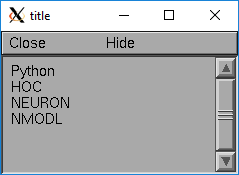
- Make the list visible on the screen. The items are normally the object names but if the second arg is present and is the name of a string symbol that is defined in the object's template, then that string is displayed in the list.
- .browser("title", strdef, "command")
- Browser labels are computed. For each item, command is executed with hoc_ac_ set to the index of the item. On return, the contents of strdef are used as the label. Some objects notify the List when they change, ie point processes when they change their location notify the list.
Warning
In the third syntactic form, command must be a HOC command, not a Python command. As of NEURON 7.4, there is no way to directly invoke a Python callback, although it can be done indirectly as in "nrnpython(\"foo()\")".
Example:
from neuron import h, gui

my_list = h.List()

for word in ['Python', 'HOC', 'NEURON', 'NMODL']:
    my_list.append(h.String(word))

my_list.browser('title', 's')   # h.String objects have an s attribute that returns the Python string
- List.selected()¶ ↑
- Syntax:
- .selected()
- Description:
- Return the index of the highlighted object or -1 if no object is highlighted.
See also
- List.scroll_pos()¶ ↑
- Syntax:
index = list.scroll_pos()
list.scroll_pos(index)
- Description:
- Returns the index of the top of the browser window. Sets the scroll so that index is the top of the browser window. A large number will cause a scroll to the bottom.
See also
- List.select_action()¶ ↑
- Syntax:
list.select_action("command")
list.select_action("command", 0or1)
- Description:
Execute a command when an item in the list List.browser() is selected by single clicking the mouse. hoc_ac_ contains the index when the command is executed. Thus l.select_action("action(hoc_ac_)") is convenient usage. action will be invoked within the object context that existed when select_action was called.
If the second arg exists and is 1 then the action is only called on the mouse button release. If nothing is selected at that time then hoc_ac_ = -1
- Example:
This example shows that the object context is saved when an action is registered.
from python import h

begintemplate A
def init():
    list = h.List()
    list.append(this)
    for i in range(5):
            obj = h.Random()
            list.append(obj)

    list.browser()
    list.select_action("act(hoc_ac_)")

def act():
    print("item %d selected in list of object %s\n", $1, this)

endtemplate A

objref a[2]
for i in range(2):
    a[i] = h.A()
- List.accept_action()¶ ↑
- Syntax:
- list.accept_action("command")
- Description:
- Execute a command when double clicking on an item displayed in the list List.browser() by the mouse. hoc_ac_ contains the index when the command is executed. Command is executed within the object context that existed when accept_action was called.
Example:
list = h.List()
for i in range (5):
        obj = h.Random()
        list.append(obj)
    obj = h.List()
    list.append(obj)

list.browser()
list.accept_action("act()")
def act():
        print("item %d accepted\n", hoc_ac_)