GUI Widgets¶ ↑
The functions below are used to create panels of buttons, menus, and field editors.
It is often convenient to encapsulate GUI elements and their state variables in a class. This allows multiple independent instances to be created. For example:
from neuron import h, gui

class MyWindow:
    def __init__(self):
        self.mystate = 0
        self.myval = 3.14
        self.checkbox = 1
        h.xpanel('demo')
        h.xradiobutton('Click me', lambda: self.clicked(0), 1)
        h.xradiobutton('or me', lambda: self.clicked(1), 0)
        h.xstatebutton('press me', (self, 'mystate'), self.statepressed)
        h.xcheckbox('I am a checkbox', (self, 'checkbox'), self.checkboxpressed)
        h.xvalue('Type a number', (self, 'myval'), 1, self.numberset)
        h.xpanel()
    def clicked(self, choice):
        print 'you switched the radio button! choice = %g' % choice
    def statepressed(self):
        print 'you pressed the state button. Value = %g' % self.mystate
    def checkboxpressed(self):
        print 'you clicked the checkbox. state = %g' % self.checkbox
    def numberset(self):
        print 'you set the number to: %g' % self.myval

window = MyWindow()
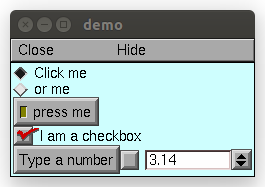
Note
Top-level variables can be accessed using the __main__ module.
- xpanel()¶ ↑
- Syntax:
h.xpanel('name')
h.xpanel('name', [0-1])
h.xpanel()
h.xpanel(x, y)
h.xpanel(scroll)
h.xpanel(scroll, x, y)
Description:
h.xpanel("name")
- h.xpanel("name", [0-1])
- Title of a new panel. Every button, menu, and value between this and a closing xpanel() command with no arguments (or placement args) belongs to this panel. If the form is used with a second argument equal to 1, then the panel is laid out horizontally. Otherwise the default is vertically.
h.xpanel()
- h.xpanel(x, y)
- done constructing the panel. so map it to the screen with position optionally specified.
h.xpanel(scroll)
- h.xpanel(scroll, x, y)
- as above but if the first arg is a number, then the value determines whether the panel will be inside a scrollbox. Scroll = 0 means a scrollbox will NOT be used. Scroll = 1 means the panel will be inside a scrollbox. Scroll = -1 is the default value and whether or not a scrollbox is used is determined by the number of panel items in comparison with the value of the panel_scroll property in the nrn.defaults file.
- Syntax:
h.xbutton('prompt', py_callable)
Description:
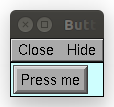
Adds a button to the currently open xpanel(). The label on the button is prompt, and when the button is clicked, it calls the py_callable.Example:
from neuron import h, gui

def on_press():
    print 'You pressed the button.'

h.xpanel('Button demo')
h.xbutton('Press me', on_press)
h.xpanel()
- Syntax:
h.xstatebutton('prompt', (obj_or_module, 'varname') [, action_fn])
- Description:
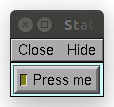
- like xbutton(), but when pressed var is set to 0 or 1 so that it matches the telltale state of the button. If the var is set by another way the telltale state is updated to reflect the correct value.
- Example:
from neuron import h, gui
import __main__

button_state = 0

def on_press():
    print 'You pressed the button. The state is now:', button_state

h.xpanel('StateButton demo')
h.xstatebutton('Press me', (__main__, 'button_state'), on_press)
h.xpanel()
- xcheckbox()¶ ↑
- Syntax:
h.xcheckbox('prompt', (obj_or_module, 'varname') [, action_fn])
- Description:
- like xstatebutton(), but checkbox appearance.
- Syntax:
h.xradiobutton('name', action_fn [, 0 or 1])
- Description:
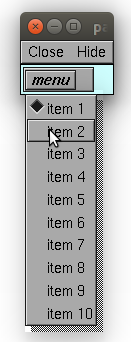
- Like an xbutton() but highlights the most recently selected button of a contiguous group (like a car radio, mutually exclusive selection). If the third argument is 1, then the button will be selected when the panel is mapped onto the screen. However, in this case the action should also be explicitly executed by the programmer. That is not done automatically since it is often the case that the action is invalid when the radio button is created.
Example:
from neuron import h, gui

def a(n):
    """function to be called when a radio button is toggled"""
    print n

def call_a(n):
    """returns a function that calls a with the specified parameter"""
    return lambda: a(n)

h.xpanel('panel')
h.xmenu('menu')
for i in xrange(1, 11):
    h.xradiobutton('item %d' % i, call_a(i))

h.xmenu()
h.xpanel()
- Syntax:
h.xmenu('title')
h.xmenu()
h.xmenu('title', 1)
h.xmenu(title, py_callable)
h.xmenu(title, py_callable, 1)
Description:
- h.xmenu("title")
- create a button in the panel with label "title" which, when pressed, pops up a menu containing buttons and other menus. Every xbutton() and xmenu() command between this and the closing xmenu() command with no arguments becomes the menu. Don't put values into menus.
- h.xmenu()
done defining the menu. Menus can be nested as in
from neuron import h, gui

def selected1():
    print 'you selected option 1'

def selected2():
    print 'you selected option 2'

h.xpanel('xmenu demo')
h.xmenu('one')
h.xmenu('two')
h.xbutton('option 1', selected1)
h.xbutton('option 2', selected2)
h.xmenu()
h.xmenu()
h.xpanel()

- h.xmenu("title", 1)
adds the menu to the menubar. Note that a top level menu with no second argument starts a new menubar. Normally these menubars have only one top level item.
from neuron import h, gui

def item_selected(n):
    print 'selected value %g' % n

h.xpanel("menubar")
h.xmenu("first")
h.xbutton("one", lambda: item_selected(1))
h.xbutton("two", lambda: item_selected(2))
h.xmenu()
h.xmenu("second", 1)
h.xbutton("three", lambda: item_selected(3))
h.xbutton("four", lambda: item_selected(4))
h.xmenu("submenu")
h.xbutton("PI", lambda: item_selected(h.PI))
h.xmenu()
h.xmenu()
h.xmenu("third", 1)
h.xbutton("five", lambda: item_selected(5))
h.xbutton("six", lambda: item_selected(6))
h.xmenu()
h.xmenu("nextline")
h.xbutton("seven", lambda: item_selected(7))
h.xbutton("eight", lambda: item_selected(8))
h.xmenu()
h.xpanel()

- h.xmenu("title", py_callable) and h.xmenu("title", py_callable, 1)
Dynamic menu added as item in panel or menu or (when third argument is 1) to a menubar. An example of the first type is the NEURONMainMenu/File/RecentDir and an example of the last type is the NEURONMainMenu/Window
When the menu title button is selected, the stmt is executed in a context like:
h.xmenu("title")
py_callable()
h.xmenu()
which should normally build a menu list and then this list is mapped to the screen as a normal walking menu.
from neuron import h, gui

def select(i):
    print 'you selected', i

def call_select(i):
    """returns a function that always calls select(i)"""
    return lambda: select(i)

n = 0
def make():
    global n
    n += 1
    for i in xrange(1, n + 1):
        h.xbutton('label %d' % i, call_select(i))

h.xpanel("test")
h.xmenu("dynamic", make)
xpanel()
Warning
The dynamic menu syntax is currently unsupported in Python, but the equivalent (passing a HOC command string) works in HOC.
- xvarlabel()¶ ↑
- Syntax:
h.xvarlabel(strref)
- Description:
- Show the string as its current value.
Example:
from neuron import h, gui

mystr = h.ref('')
h.xpanel('strref demo')
h.xlabel('Dynamic text will appear below:')
h.xvarlabel(mystr)
h.xpanel()

# change the text displayed by changing mystr
mystr[0] = 'Hello world!'

Warning
Python strings are immutable. Thus the text displayed will only automatically change if a strref is used, as in the example.
- xvalue()¶ ↑
Syntax:
h.xvalue("prompt", (obj_or_module, "varname") [, boolean_deflt, "action" [, boolean_canrun]])
h.xvalue("prompt", "variable", 2)
Description:
- h.xvalue("prompt", (obj_or_module, "varname") [, boolean_deflt, "action" [, boolean_canrun]])
- create field editor for variable with the button labeled with "prompt". If boolean_deflt == 1 then add a checkbox which is checked when the value of the field editor is different that when the editor was created. Execute "action" when user enters a new value. If boolean_canrun == 1 then use a default_button widget kit appearance instead of a push_button widget kit appearance.
- h.xvalue("prompt", (obj_or_module, "varname"), 2)
- a field editor that keeps getting updated every 10th doNotify().
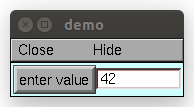
Example:
from neuron import h, gui
import __main__

val = 42

h.xpanel('demo')
h.xvalue('enter value', (__main__, 'val'))
h.xpanel()

# changing val in the dialog will change val as seen by the program
See also
The example at the top of the file, which uses xvalue in an object.
- xpvalue()¶ ↑
- Syntax:
h.xpvalue('prompt', ref, ...)
- Description:
- like xvalue() but uses a reference to the variable.
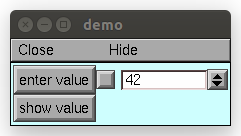
Example:
from neuron import h, gui

val = h.ref(42)

def show_val():
    print 'value is:', val[0]

h.xpanel('demo')
h.xpvalue('enter value', val, 1)
h.xbutton('show value', show_val)
h.xpanel()
See also
- xfixedvalue()¶ ↑
Syntax:
h.xfixedvalue("prompt", (obj_or_module, "varname"), boolean_deflt, boolean_usepointer)
- Description:
- like xvalue() but cannot be changed by the user except under program control and there can be no action associated with it.
Warning
This is not implemented. For now, try to do the same thing with xvarlabel().
- xslider()¶ ↑
- Syntax:
h.xslider((obj_or_module, "varname"), [low, high], [on_slide], [vert], [slow])
h.xslider(ref_var, [low, high], [on_slide], [vert], [slow])
- Description:
- Slider which is attached to the variable var. Whenever the slider is moved, the optional on_slide is executed. The default range is 0 to 100. Steppers increase or decrease the value by 1/10 of the range. Resolution is .01 of the range. vert=1 makes a vertical slider and if there is no on_slide may be the 4th arg. slow=1 removes the "repeat key" functionality from the slider(and arrow steppers) and also prevents recursive calls to the on_slide. This is necessary if a slider action is longer than the timeout delay. Otherwise the slider can get in a state that appears to be an infinite loop. The downside of slow=1 is that the var may not get the last value of the slider if one releases the button during an action.
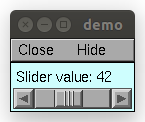
Examples:
from neuron import h, gui
import __main__

val = 42
val_str = h.ref('Slider value:         ')
def show_val():
    global val_str
    val_str[0] = 'Slider value: %g' % val

h.xpanel('demo')
h.xvarlabel(val_str)
h.xslider((__main__, 'val'), 0, 100, show_val)
h.xpanel()
show_val()
It is slightly more efficient to use an h.ref instead of a tuple. The above example is functionally equivalent to:
from neuron import h, gui

val = h.ref(42)
val_str = h.ref('Slider value:         ')
def show_val():
    global val_str
    val_str[0] = 'Slider value: %g' % val[0]

h.xpanel('demo')
h.xvarlabel(val_str)
h.xslider(val, 0, 100, show_val)
h.xpanel()
show_val()
- units()¶ ↑
- Syntax:
on or off = h.units(1 or 0)
current_units = h.units("varname" [, "units string"])
- Description:
When units are on (default on) value editor buttons display the units string (if it exists) along with the normal prompt string. Units for L, diam, Ra, t, etc are built-in and units for membrane mechanism variables are declared in the model description file. See modlunit . Note that units are NOT saved in a session. Therefore, any user defined variables must be given units before retrieving a session that shows them in a panel.
The units display may be turned off with h.units(0) or by setting the *units_on_flag: off in the nrn/lib/nrn.defaults file.
If the first arg is a string, it is treated as the name of the variable. This is restricted to hoc variable names of the style, "name", or "classname.name". Apart from the circumstance that the string arg style must be used when executed from Python, a benefit is that it can be used when an instance does not exist (no pointer to a variable of that type). If there are no units specified for the variable name, or the variable name is not defined, the return value is the empty string.
Examples:
print h.units('dt')        # ms
print h.units('gna_hh')    # S/cm2
print h.units('Ra')        # ohm-cm
print h.units('L')         # um
print h.units('ExpSyn.g')  # uS
Warning
When passing a string to h.units, note that the string must be the name of a HOC variable. Unfortunately, there is currently no way to declare the units of a Python variable.