- File
- aopen · chooser · close · dir · eof · flush · getname · gets · isopen · mktemp · printf · ropen · scanstr · scanvar · seek · tell · unlink · vread · vwrite · wopen · xopen
Note
Python provides native support for manipulating files. Use that whenever possible to ensure your code is understandable by the greatest number of people.
File Access (objected-oriented via NEURON)¶ ↑
- class File¶ ↑
- Syntax:
fobj = h.File()
fobj = h.File("filename")
- Description:
This class allows you to open several files at once, whereas the top level functions, ropen() and wopen() , allow you to deal only with one file at a time.
The functionality of xopen() is not implemented in this class so use
h.xopen(fobj.getname())
to execute a sequence of interpreter commands in a file.
Example:
from neuron import h
f1 = h.File()               //state that f1, f2, and f3 are pointers to the File class
f2 = h.File()
f3 = h.File()
f1.ropen("file1")   //open file1 for reading
f2.wopen("file2")   //open file2 for writing
f3.aopen("file3")   //open file3 for appending to the end of the file
opens file1, file2, and file3 for reading, writing, and appending (respectively).
Warning
The mswindows/dos version must deal with the difference between binary and text mode files. The difference is transparent to the user except for one limitation. If you mix text and binary data and you write text first to the file, then you need to do a File.seek(0) to explicitly switch to binary mode just after opening the file and prior to the first File.printf. An error message will occur if you read/write text to a file in text mode and then try to read/write a binary vector. This issue does not arise with the unix version.
See also
- File.ropen()¶ ↑
- Syntax:
.ropen()
.ropen("name")
- Description:
- Open the file for reading. If the argument is not present it opens (for reading) the last specified file.
- File.wopen()¶ ↑
- Syntax:
.wopen()
.wopen("name")
- Description:
- Open the file for writing. If the argument is not present it opens the last specified file.
- File.aopen()¶ ↑
- Syntax:
.aopen()
.aopen("name")
- Description:
- Open the file for appending to the end of the file. If the argument is not present it opens the last specified file.
- File.xopen()¶ ↑
- Syntax:
.xopen()
.xopen("name")
- Description:
Open the file and execute it. (not implemented)
Note: if instead of a "name", the number 0,1,or 2 is specified then the stdin, stdout, or stderr is opened. (not implemented)
- File.close()¶ ↑
- Syntax:
- .close()
- Description:
- Flush and close the file. This occurs automatically whenever opening another file or destroying the object.
- File.mktemp()¶ ↑
- Syntax:
- success = f.mktemp()
- Description:
- Sets the name to a temporary filename in the /tmp directory (or other writable path for mswin and mac). Success returns 1.
Example of creating a temporary file:
f = h.File()
if f.mktemp() != 1:
    raise Exception('Unable to create temporary file')
# create a tempoary file, get its name
temp_file_name = f.getname()

# do stuff, possibly using regular Python File IO instead

# dispose of the temporary file
f.unlink()
- File.unlink()¶ ↑
- Syntax:
- success = f.unlink()
- Description:
- Remove the file specified by the current name. A return value of 1 means the file was removed (or at least it's link count was reduced by one and the filename no longer exists).
- File.printf()¶ ↑
- Syntax:
- .printf("format", args, ...)
- Description:
- As in standard C printf and the normal NEURON printf() .
- File.scanvar()¶ ↑
- Syntax:
- .scanvar()
- Description:
Reads the next number as in the function fscan() and returns its value.
Note: in order that .eof will return true after the last number, the last digit of that number should either be the last character in the file or be followed by a newline which is the last character in the file.
- File.scanstr()¶ ↑
- Syntax:
- .scanstr(strptr)
- Description:
- Read the next string (delimited by whitespace) into strptr (must be a pointer to a NEURON string not a Python string). Returns the length of a string (if failure then returns -1 and the string pointed to by strptr is unchanged).
- File.gets()¶ ↑
- Syntax:
- .gets(_ref_str)
- Description:
Read up to and including end of line. Returns length of string. If at the end of file, returns -1 and does not change the argument.
_ref_str is a reference to a NEURON string (e.g. one created via _ref_str = h.ref('')); it is not a Python string.
- File.getname()¶ ↑
- Syntax:
name = fobj.getname()
name = fobj.getname(strptr)
- Description:
- Return the name of the last specified file as a string. For backward compatibility, if the arg is present (must a pointer to a NEURON string) also copy it to that.
- File.dir()¶ ↑
- Syntax:
- dirname = file.dir()
- Description:
- Return the pathname of the last directory moved to in the chooser. If the File.chooser() has not been created, return the empty string.
- File.chooser()¶ ↑
- Syntax:
.chooser()
.chooser("w,r,a,x,d or nothing")
.chooser("w,r,a,x,d or nothing", "Banner", "filter", "accept", "cancel", "path")
- Description:
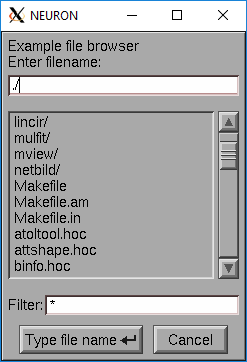
File chooser interface for writing , reading, appending, or just specifying a directory or filename without opening. The banner is optional. The filter, eg. "*.dat" specifies the files shown in the browser part of the chooser. The "path" arg specifies the file or directory to use when the browser first pops up. The form with args sets the style of the chooser but does not pop it up. With no args, the browser pops up and can be called several times. Each time starting where it left off previously.
The "d" style is used for selecting a directory (in contrast to a file). With the "d" style, three buttons are placed beneath the browser area with Open centered beneath the Show, Cancel button pair. The Open button must be pressed for the dialog to return the name of the directory. The Show button merely selects the highlighted browser entry and shows the relevant directory contents. A returned directory string always has a final "/".
The "x" style is unimplemented. Use
f.chooser("", "Execute a hoc file", "*.hoc", "Execute")
if f.chooser():
    h.xopen(f.getname())
Example:
from neuron import h, gui

f = h.File()
f.chooser('', 'Example file browser', '*', 'Type file name', 'Cancel')
while f.chooser():
    print(f.getname())
The following comes courtesy of Zach Mainen, zach@helmholtz.sdsc.edu:
- File.vwrite()¶ ↑
- Syntax:
.vwrite(_ref_x)
.vwrite(n, _ref_x)
- Description:
Write binary doubles to a file from an array or variable using fwrite(). The form with two arguments specifies the number of elements to write and the address from which to begin writing. With one argument, n is assumed to be 1. Must be careful that x[] has at least n elements after its passed address.
i.e. If x = h.Vector(10) and f is an instance of a File opened for writing, then one might call f.vwrite(5, x._ref_x[0] to write the first five values to a file.)
- File.vread()¶ ↑
- Syntax:
.vread(_ref_x)
.vread(n, _ref_x)
- Description:
- Read binary doubles from a file into a pre-existing Vector or variable using fread().
See also
- File.seek()¶ ↑
- Syntax:
.seek()
.seek(offset)
.seek(offset,origin)
- Description:
- Set the file position. Any subsequent file access will access data beginning at the new position. Without arguments, goes to the beginning of file. Offset is in characters and is measured from the beginning of the file unless origin is 1 (measures from the current position) or 2 (from the end of the file). Returns 0 if successful, non-zero on error. Used with tell().